
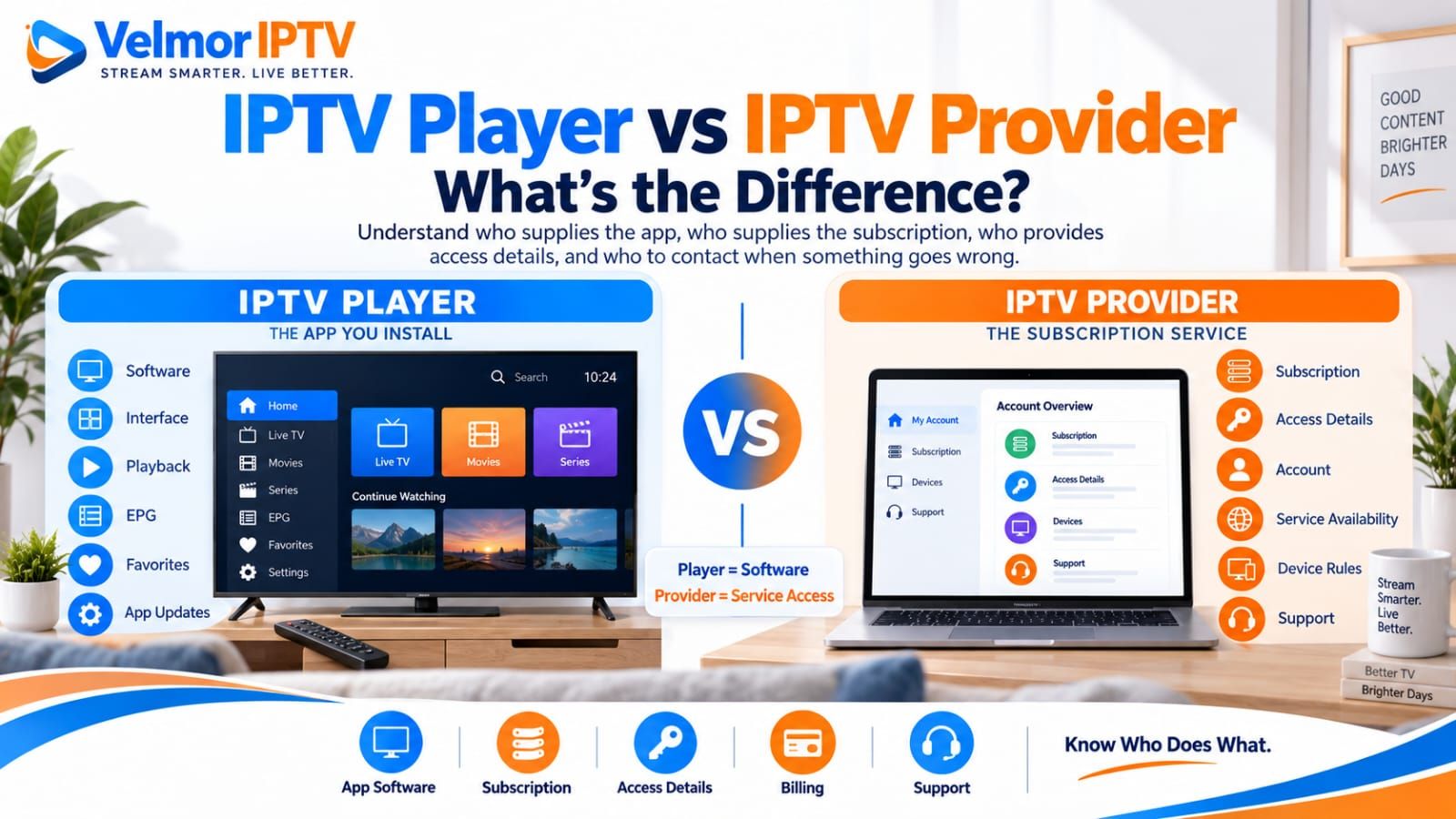
An IPTV player and an IPTV provider perform different jobs. The player is the software interface used to enter supported access details, navigate available items, and control playback. The provider supplies authorized service access, normally controls the subscription and account rules, and may issue credentials, playlist information, or another supported login method.
They may be operated by separate companies, charge separate fees, publish separate privacy terms, and offer support for different parts of the setup. Understanding that boundary prevents a common mistake: asking an app developer to activate a provider account, or asking a provider to repair a third-party app crash. If you first need the wider concept, start with what IPTV is and how it works.
IPTV Player vs IPTV Provider: The Short Answer
An IPTV player is an application. It can provide the visible interface, playback controls, search, favorites, categories, navigation, and electronic program guide display when those features and source data are supported. It does not automatically supply a service subscription or channels.
An IPTV provider supplies authorized access under its own offer and terms. It may issue a username and password, server address, playlist information, provider-specific login, or another supported method. It generally controls the account status, plan, available authorized service data, and applicable device or connection rules. The provider may be separate from the player developer.
| Responsibility | IPTV Player | IPTV Provider |
|---|---|---|
| App or software | Develops or distributes the viewing application | May recommend or supply guidance for compatible software but does not necessarily develop it |
| Subscription or service access | Does not automatically supply access merely because it is installed | Supplies authorized access according to the selected offer and terms |
| Credentials | Accepts supported details and may store or process them | Issues or manages the supported account or access details |
| Channel or service availability | Displays source data it can retrieve and understand | Controls or supplies the authorized service data available to the account |
| Device and account limits | May have its own app-license or device rules | Sets plan, account, device, or simultaneous-use rules for service access |
| Player features | Controls interface, search, favorites, categories, and supported guide display | Supplies underlying data where included, but does not control every third-party interface |
| App updates | Publisher maintains versions, compatibility, and the update path | May communicate service-side changes but does not maintain every external player |
| Billing | May charge separately for an app license or features | Charges for service access according to its current plan terms |
| Privacy | Responsible for its app’s data handling and permissions | Responsible for its account, support, subscription, and applicable payment-data handling |
| Support | Handles app installation, crashes, interface, and player-account questions | Handles provider account, issued details, plan, and service-access questions |
| Playback interface | Controls visible playback controls and supported local options | Supplies the authorized source but may not control third-party control layouts |
| Service or account status | May report an error but normally cannot activate a separate provider account | Controls provider-side authorization, expiry, and applicable account status |
What Is an IPTV Player?
An IPTV player is software that turns supported provider access into a navigable viewing experience on a television, streaming device, phone, tablet, or computer. Its responsibilities can include accepting access details, organizing the information returned by the source, displaying guide data, presenting playback controls, and using a supported playback engine.
The feature set varies. One player may offer favorites, category controls, search, captions, or multiple supported playback options while another uses a simpler interface. Those differences belong to the software layer. They do not mean the player created the underlying channels, account, or subscription.
App availability also varies by device, operating-system version, region, and publisher decisions. The separate guide to choosing an IPTV player covers compatibility, publisher verification, permissions, remote usability, and payment checks without treating one app as universally best.
What Is an IPTV Provider?
An IPTV provider is the party that offers authorized service access to a customer under defined subscription terms. The provider controls its account records and determines what access is available for the selected plan. It may supply setup instructions, account support, compatible input information, and a method for reaching the service.
A provider may recommend a compatible player, offer a dedicated app, or leave the customer to select a reputable third-party player that supports the issued method. None of those arrangements is universal. Confirm the actual relationship instead of assuming that a shared logo, setup message, or recommendation means the provider developed the app.
Provider evaluation includes the offer, device needs, setup expectations, plan terms, support, and applicable policies. The IPTV subscription buyer’s guide owns that broader buying decision; this article concentrates on the line between service and software.
Who Supplies the Subscription?
The provider supplies the IPTV service subscription. A third-party player can be installed before any provider account exists, but installation alone normally produces no authorized service access. A player demo, trial period, or premium activation relates to the app unless its terms explicitly describe a separate provider arrangement.
Likewise, purchasing a subscription does not necessarily purchase a paid third-party player. The provider may support several app choices, recommend one, supply its own software, or require a specific supported method. Read what each payment covers and keep receipts or confirmations associated with the correct company.
Plan duration, permitted simultaneous use, supported device count, renewal, and account status are provider-side terms unless a separate player license adds its own restrictions. Never infer a provider rule from an app-store description or an app-license rule from the provider’s plan page.
Who Supplies the Login or Access Details?
The provider normally supplies or authorizes the service-access details. Depending on its supported setup, these may include a username and password, server URL, playlist or M3U-style information, a provider-specific login, or another method. The player supplies the matching input screen only if it supports that method.
Use the details exactly as issued. Do not invent a server address, change a port, convert a playlist through an unknown site, or assume one player label maps to a different format. For a focused explanation of two common methods, see the M3U vs Xtream Codes comparison.
Access details are sensitive. A playlist URL can contain a username, password, or token even when it resembles an ordinary link. Enter it only into a verified compatible player or legitimate provider flow, and never post complete details in public app reviews, screenshots, forums, or support threads.
Who Controls Channels, Packages, and Account Rules?
The provider controls the service-side offer and the authorized data available to an account. That normally includes the selected plan, account status, and any applicable rules for devices or simultaneous connections. A third-party player can organize, filter, hide, or favorite items it receives, but those interface actions do not add provider authorization.
A category appearing empty can therefore cross several boundaries. The provider may not have supplied expected source data, the account may lack access, the player may have filtered or failed to display it, or retrieval may not have completed. Observe whether the same authorized data appears through another supported configuration before deciding who controls the symptom.
Never use a player setting, shared credential, converter, or unofficial panel to try to bypass provider account rules. If the intended device or connection use is unclear, ask the provider and consult its current plan terms before adding devices or simultaneous sessions.
Who Maintains the App?
The app publisher maintains the player’s code, releases, platform compatibility, permissions, interface, and supported update path. If the player comes from a third party, the provider cannot directly fix its crashes, remote focus, store availability, or missing interface feature. It may only confirm whether the app and access method are supported.
A provider-owned or provider-commissioned app can put both roles under one brand, but the responsibilities still exist. One team or support route may handle software while another handles accounts and service data. Ask which product version, platform, and support channel apply rather than assuming a single company means a single technical system.
Player Fees vs Provider Subscription Fees
Player fees and provider fees can be separate. Some players may be free, while others may charge for activation, premium features, an app account, device licenses, support, or updates. Provider charges cover service access under the provider’s plan. Neither model is universal, so verify both at the point of purchase.
Buying a player does not automatically buy IPTV service. Buying IPTV service also does not automatically include every paid external player. Before paying, identify the seller, product name, duration, device scope, renewal behavior, included features, support route, and available cancellation or refund terms. Do not assume one seller can refund the other seller’s charge.
When comparing total cost, keep the two line items visible. A provider trial may test service access, while a player trial may test software features; one does not necessarily trial the other. Avoid invented price comparisons and rely on current written terms from each responsible party.
Privacy and Security Responsibilities
Both sides may handle different data and should explain their own practices. A player may process local settings, credentials entered into the app, device information, app permissions, viewing-related data, or analytics depending on the publisher. Do not assume that every external player collects the same information.
A provider may handle account details, subscription information, issued credentials, support messages, and payment-related information depending on its checkout or contact flow. It should describe those practices in its privacy information. If another payment or communications provider participates, review the applicable disclosures rather than assuming all data stays with one brand.
Review both the player publisher’s privacy policy and the provider’s privacy information. Compare requested app permissions with actual functions, use private support channels for account questions, and keep platform protections enabled. Unknown APKs, cracked players, credential-sharing tools, public playlist checkers, and unverified converters create unnecessary exposure and are not valid substitutes for support.
Who Should You Contact When Something Goes Wrong?
Contact the party that owns the failing layer first. A concise report should name the device, operating system, player and version, access method without secrets, time observed, exact non-sensitive error, and whether the symptom appears in another supported configuration.
- Contact the player publisher when the app will not install, crashes, has broken remote navigation, lacks a documented feature, or requests permissions the publisher does not explain.
- Contact the provider when carefully verified credentials are rejected, an account appears inactive, provider-issued information changed, expected authorized service data is absent, or a plan limit may have been reached.
- Keep the boundary open when buffering, one stream, empty categories, guide differences, or device compatibility could involve more than one layer.
For a rejected login or playlist, follow the login and playlist troubleshooting guide before changing formats or contacting random third parties. Its controlled checks help distinguish incorrect entry, player-format mismatch, account authorization, and provider-side questions.
Common Problems and Which Side to Check First
Symptoms provide clues, but they rarely prove ownership by themselves. Start with the narrowest observation, change one variable at a time, and avoid assigning blame from a single screen. A player can display a provider error, while a provider-side change can expose a compatibility issue in only one app.
| Observed problem | First side to check | Important qualification |
|---|---|---|
| App will not install or open | Player publisher | Also verify the exact device, OS version, storage, region, and official listing |
| App crashes during ordinary navigation | Player publisher | Record version and steps; source data or device resources may still contribute |
| Remote navigation is poor | Player publisher | Confirm the app is the television edition for that platform |
| Credentials rejected after careful verification | Provider | First confirm the player input method matches the issued format |
| Account appears inactive or expired | Provider | The player normally cannot reactivate a separate service account |
| Expected authorized service data does not load | Provider first | Compare a supported player because display or retrieval can still differ |
| Account or device limit reached | Provider | A separate player license may also have its own device limit |
| Buffering or intermittent playback | Shared or uncertain | Source, route, home network, device, and player can all affect the symptom |
| One stream fails | Shared or uncertain | Compare other items and another supported configuration before concluding |
| EPG differs between players | Shared or uncertain | Source data, matching, refresh, timezone, and display behavior can differ |
For playback interruptions, use the IPTV buffering troubleshooting guide instead of assuming that a player switch, VPN, DNS change, or buffer value is a universal solution. For guide-only symptoms, the IPTV EPG guide separates guide data from the video stream.
Can One Provider Work With Multiple Players?
Possibly, when the provider permits it and each player supports the issued access method on the intended device. Compatibility is not universal. One provider may support several third-party players, a dedicated app only, or different methods for different platforms. Ask for current supported options rather than relying on an old tutorial.
Multiple compatible players can offer different interfaces, guide handling, search, remote behavior, and playback engines while using the same authorized account. That can make a controlled comparison useful, but account and simultaneous-use rules still apply. Installing two players does not create two permitted connections.
Device-specific installation belongs in the relevant Smart TV guide, Fire TV guide, or Android TV and Google TV guide. Check the exact platform listing and provider guidance before entering access details.
Can One Player Work With Multiple Providers?
Possibly, if the player supports each provider’s issued method and its own terms allow the intended account or playlist arrangement. A general-purpose player may accept more than one compatible source, while another app may be designed around one provider or one account. Verify the feature rather than inferring it from the app name.
Separate provider accounts remain separate even when one interface can display them. Each provider controls its own authorization, plan, service data, support, and account rules. The player’s ability to save multiple profiles does not merge subscriptions or transfer access between providers.
Protect every set of credentials independently. Use clear local labels that do not expose passwords or tokens, remove old profiles from devices you no longer control, and review what the player synchronizes through any optional app account. Do not upload sources to an external merger or converter merely for convenience.
What to Check Before Paying
Before paying either side, identify the seller and the exact product being purchased. For the player, verify publisher identity, device compatibility, accepted access format, license scope, included features, renewal model, privacy terms, support, and the legitimate payment destination. For the provider, verify the plan, duration, device or connection rules, supported setup method, service terms, privacy information, and support route.
- Write down whether the charge is for player software or provider service access.
- Confirm the player supports the exact device, region, and provider-issued method.
- Confirm who issues credentials and who can change account status.
- Review separate player-license and provider-plan device rules.
- Read both privacy notices and understand app permissions before entering credentials.
- Check each seller’s current billing, renewal, cancellation, refund, and support information.
- Use an available legitimate trial to test the intended combination without treating it as a future guarantee.
For Velmor, current one-device plan information is maintained on the pricing page. The existing 24-hour free trial for 1 device can help check the intended device, supported access, and compatible player before a longer service commitment. Use the contact route for account or provider questions and the setup guide for the supported setup sequence.
IPTV Player vs Provider Questions
Is an IPTV Player the Same as an IPTV Provider?
No. The player is the software interface, while the provider supplies authorized service access and controls its account terms. They may be separate companies with separate billing and support.
Does an IPTV Player Include a Subscription?
Not automatically. Installing or paying for player software does not necessarily purchase provider access. Read the app offer and provider offer separately.
Who Gives Me My IPTV Login Details?
The provider normally issues or authorizes the service-access details. The player only provides an input method when it supports the issued format. Keep those details private.
Do I Pay the Player and Provider Separately?
You may. Some players are free and others charge, while the provider has its own subscription terms. Confirm exactly what each charge covers before paying.
Can One Provider Work With Several Players?
Sometimes, when the provider permits the intended use and each player supports the issued method and device. Provider support, player compatibility, and account limits all need separate confirmation.
Can One Player Work With Different Providers?
Sometimes, if the player supports each access method and permits multiple profiles or sources. Each provider account, authorization, and set of terms remains separate.
Who Should I Contact If Login Fails?
First verify that the player input method matches the provider-issued format and recheck each field privately. Contact the provider about account authorization or issued details; contact the publisher if the correct input option is missing or the app fails before it can submit the login.
Who Should I Contact If the App Crashes?
Start with the player publisher and include the device, OS, app version, non-sensitive steps, and error. Also note whether the crash depends on loading particular provider data, because the boundary may require evidence from both sides.
Can Changing Players Fix Buffering?
A different compatible player can help test whether the symptom may be app-specific, but it does not fix every source, provider, route, network, or device problem. Compare one variable at a time.
What Should I Verify Before Paying?
Identify whether you are buying software or service access, then verify the seller, compatibility, terms, device scope, privacy information, support route, payment model, and what happens if the product does not fit. For wider questions, review the IPTV FAQ.