
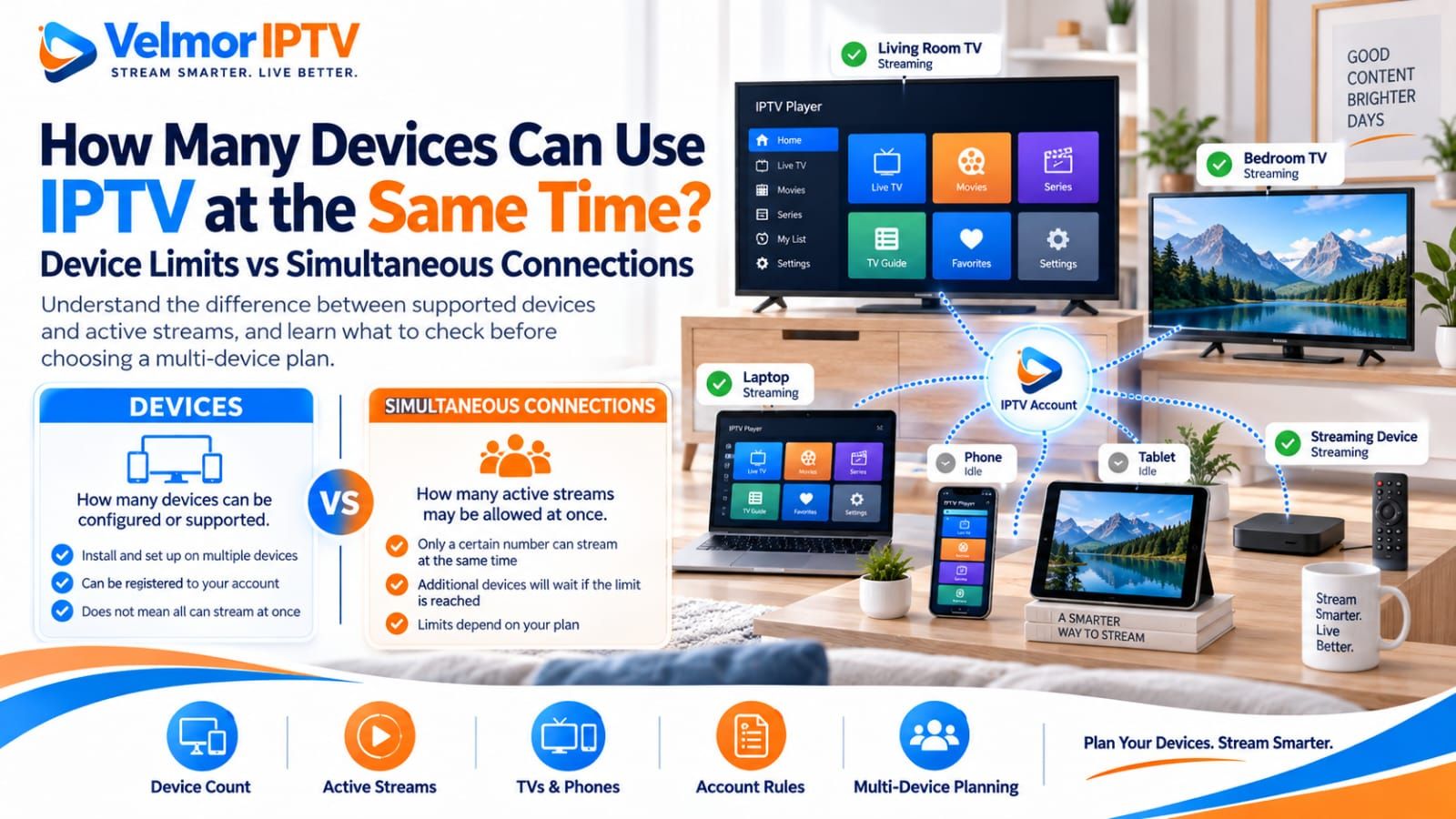
There is no universal IPTV device limit. How many devices can be configured, and how many can stream at the same time, depends on the provider, purchased plan, account and session rules, supported devices, player behavior, and provider terms. “Can install on four devices” and “can stream on four devices at once” are not automatically the same statement.
Start by separating devices from active connections. A household might install compatible players on several screens but use only one stream at a time, while a different plan may permit several concurrent sessions. The number printed beside a plan needs a written definition before it can answer either question. If you are new to the service model, first review what IPTV is and how it works.
How Many Devices Can Use IPTV at the Same Time?
The correct number is the simultaneous-use allowance stated for your provider account and purchased plan. It may be one, several, or defined by another account rule; no single number applies across the market. A device that supports an IPTV player is not automatically authorized to use a particular account concurrently.
Five separate questions can affect the answer: how many devices can be registered, how many can hold the account configuration, how many active streams are permitted, whether use from different locations is allowed, and whether the player has its own device-license limit. Ask about each one that matters to your household.
Use plan labels only as a starting point. If “devices,” “connections,” or “screens” is not defined, request clarification before paying. Keep the provider’s response with the order so later connection behavior can be compared with the terms you were given.
Device Limit vs Simultaneous Connection Limit
A device limit describes how many devices may be registered, configured, or supported under an account. A simultaneous connection limit describes how many active playback sessions may run at once. Providers can define and enforce these concepts differently, so one limit should never be used as a substitute for the other.
| Term | What it may describe | What to verify |
|---|---|---|
| Supported device | A device category on which the service can be used with a compatible setup | Exact platform, player, access format, and provider support |
| Registered device | A device recorded or activated against the account | Registration cap and how replacement or removal works |
| Configured device | A device on which access details have been entered | Whether configuration itself counts against any limit |
| Simultaneous connection | An active session or stream counted at the same time | How the provider defines active use and the plan allowance |
| Player license | The app publisher’s permission to use paid software on devices | Whether the license is per device, account, or platform |
For example, a provider might allow an account to be configured on several household devices while permitting only one active stream. A different multi-device plan might allow more than one concurrent session. These are hypothetical models, not Velmor terms or market standards. The provider’s current wording controls the real account.
One Account on Multiple Devices: What That Can Mean
“Use one account on multiple devices” can mean several different things. It may mean the same credentials can be saved on more than one approved device, that devices can be swapped, or that several devices can stream concurrently. Unless simultaneous use is stated, the phrase does not prove that all configured devices may play at once.
Account rules may also distinguish installed devices, registered hardware, active sessions, locations, or connection types. A phone used occasionally and a living-room television used every evening might count the same, differently, or only while active. Do not infer the provider’s model from another service or player.
Sharing outside the account terms is not a valid way to test the boundary. Keep credentials within the permitted household or user scope, do not resell access, and do not clone or distribute login details. If the wording is unclear, contact the provider before configuring another device.
How Simultaneous IPTV Connections Work
At a high level, a simultaneous connection is a provider-counted session using service access at the same time as another. The provider’s system may associate activity with an account, stream request, device, application session, or another implementation-specific signal. End users do not need to manipulate that mechanism; they need to know the permitted count and use the account accordingly.
Hypothetical example A: a plan allows several devices to retain configuration, but only one active stream. The bedroom television must stop before the living-room television starts. Hypothetical example B: a multi-device plan permits several simultaneous sessions, allowing different household members to watch at once within the plan terms.
Hypothetical example C: a provider applies a device-registration rule as well as a concurrent-session rule. Replacing hardware could require removing an old device even when no stream is active. These examples show why “How many devices?” needs a second question: “How many may be active together?”
Why One Device Can Disconnect Another
One device starting while another stops may indicate that the simultaneous-connection allowance has been reached, but that is not the only possibility. The same account or session may have been reused, the provider may handle concurrent sessions in a particular way, a player may retain a background session, or the account state may have changed.
First reproduce the symptom carefully. Stop playback on every device, close the player normally, wait only as directed by the provider or player documentation, and test one device. Then add the second device while noting the time, affected item, player, and exact message. Do not repeatedly reconnect several devices at once.
If the limit should allow the intended use, compare the provider’s written terms and ask whether an earlier session remains active. If a login is rejected or access details appear invalid rather than merely interrupted, follow the login and playlist troubleshooting guide without exposing credentials.
What Counts as an Active Connection?
The provider must define what its system counts as active. Depending on implementation, active playback, an open player session, a background stream, a reconnecting request, or a session awaiting expiry may matter. There is no universal timeout period or session rule that can be safely assumed.
Leaving an app on screen does not prove that the provider has released the connection, while returning to a device home screen does not always prove a stream continues. Use the player’s normal stop and exit controls, avoid forceful resets unless documented, and observe whether activity actually ends.
When support is needed, describe the sequence rather than diagnosing it yourself: which device started first, which stopped, whether the first resumed after the second closed, and how long the behavior persisted. That evidence is more useful than guessing a session timeout or changing network settings.
TVs, Phones, Tablets, and Streaming Devices
A television, phone, tablet, Fire TV device, Android TV or Google TV device, and other streaming box can each be a device in a household plan, but whether they count identically depends on provider terms. The hardware category alone does not establish registration or concurrent-use treatment.
Also separate a television from an attached streaming device. The player may actually run on the Fire TV or Android TV box rather than the display, so the provider or app may identify the streaming hardware as the active device. Ask how the planned setup is counted instead of assuming one physical screen equals one account device.
For platform-specific installation, use the Smart TV guide, Fire TV guide, or Android TV and Google TV guide. Those guides explain device setup without changing the provider’s account limits.
How to Plan for a Multi-Device Household
Plan around peak simultaneous viewing, not the total number of screens you own. List the living-room television, bedroom television, phones, tablets, and streaming devices that may use the service. Then mark which people are likely to watch at the same time on an ordinary evening or weekend.
- Regular screens: devices used frequently enough that permanent configuration matters.
- Occasional screens: phones or tablets used only when the main television is unavailable.
- Concurrent viewers: people whose normal schedules overlap.
- Shared screens: televisions watched together, which may need one active session rather than one per person.
- Second locations or travel: uses that require explicit provider permission rather than an assumption.
A home with four configured devices may need only one simultaneous connection if everyone watches together, or may need more if separate viewers regularly watch at once. Conversely, a plan label showing several devices does not necessarily fit frequent concurrent viewing unless that behavior is permitted. Match the plan to the peak realistic case without sharing outside its terms.
What to Check Before Buying a Multi-Device Plan
Before buying, ask for definitions in writing. The goal is to know how many devices may hold or register access, how many sessions may play simultaneously, and which other rules affect changes, locations, and app licenses. A general “multi-device” label is not enough.
- How many devices are supported, configured, or registered under the plan?
- How many simultaneous connections or active streams are permitted?
- Is device registration required, and how are old devices removed or replaced?
- Are connections counted per account, per stream, per device, or by another stated rule?
- Do mobile devices and televisions count the same way?
- Is concurrent household use explicitly permitted?
- Is use from different locations permitted, restricted, or unsupported?
- Does changing hardware or reinstalling a player affect any device allowance?
- Are multi-device features included in the plan or charged separately?
- What does support recommend when one allowed device interrupts another?
Keep player licensing separate from provider access. A paid player may have its own device activation terms even when the provider plan allows the household’s intended sessions. The player-versus-provider guide explains which party owns each rule, while the IPTV pricing guide covers plan comparison without inventing device semantics.
How to Test Multiple Devices Safely
Test only within the purchased plan and provider terms. Use devices you control, keep credentials private, and change one condition at a time. A controlled test can confirm observed behavior; it should not probe for ways around an account restriction.
- Confirm the permitted device and simultaneous-use counts before starting.
- Choose two supported devices and compatible players already approved for the account method.
- Start one ordinary stream and confirm stable playback.
- Start the second permitted session while recording the exact time and result.
- Stop each stream through the normal playback controls and close the players normally.
- Repeat only if needed to confirm a result, without adding unapproved devices or locations.
- Contact the provider with non-sensitive observations when behavior differs from the stated plan.
A free trial can be useful when its terms permit multi-device testing, but do not assume that it has the same connection allowance as a paid plan. Confirm the trial conditions first. Avoid credential sharing, cloned configurations, account resale, or VPN and DNS tricks intended to evade a limit.
What Happens When You Exceed the Allowed Limit?
The result varies by provider and implementation. A new stream might be rejected, an earlier session might stop, the player may show a generic error, the account may require a session to close, or support may need to review the account state. None of these outcomes is guaranteed or universal.
Do not keep retrying across many devices, share credentials, or alter network identity to test enforcement. Stop extra sessions, use normal app controls, and compare the observed count with the purchased plan. If the account still behaves unexpectedly, preserve the error and contact the provider.
If only one app exhibits the conflict while another supported player follows the expected limit on the same device, a player-specific session behavior becomes more plausible. That comparison does not authorize extra streams or prove provider fault; it simply narrows the boundary for support.
Device Limits, Player Apps, and Provider Rules
Provider connection rules and player license rules are separate. The provider controls service authorization and the plan’s permitted use. The player publisher controls where its software may be installed or activated and which devices and access formats it supports. Both sets of terms must fit the intended setup.
For example, a provider plan could permit the household’s intended sessions while a paid app license covers fewer devices, requiring another legitimate player license or compatible app. The reverse can also occur: an app license may cover several devices while the provider plan allows fewer active sessions. These examples illustrate separate constraints, not market norms.
Choose a player only after confirming the exact device and issued access method. The IPTV player selection guide covers app compatibility, trust, privacy, and usability. Installing another player does not increase the provider’s permitted connection count.
Internet and Home Network Considerations
Multiple simultaneous streams can increase household bandwidth demand, but there is no universal Mbps figure that suits every service or home. Demand varies with stream quality and bitrate, while results also depend on provider delivery, internet route, household traffic, Wi-Fi conditions, device capability, and player behavior.
Consider where each device will be used. A living-room television near the router may behave differently from a bedroom device behind several walls. Wired Ethernet can reduce Wi-Fi variability where the device and home support it, but it does not change account limits or repair provider authorization.
Test concurrent viewing at the time and locations that reflect normal household use. If both sessions are authorized but playback buffers, freezes, or stops, use the buffering troubleshooting guide to separate source, route, home network, device, and player evidence. Do not confuse a capacity problem with a connection-limit message.
Velmor IPTV One-Device Plans
Every current Velmor plan is for 1 device across the available 1-month, 3-month, 6-month, and 12-month durations. Current totals are maintained on the pricing page; this article does not duplicate the price list.
The one-device plan label does not establish additional concurrent-session, location, switching, or registration rules that the repository does not explicitly state. Confirm any simultaneous-use expectation before purchase.
The existing 24-hour free trial for 1 device can help evaluate the intended device and compatible player within the trial terms. For a specific one-device plan or simultaneous-use question, use the contact page before purchasing. The general setup guidance explains the supported sequence without changing plan limits.
IPTV Device and Connection Questions
Can I Use IPTV on More Than One Device?
Possibly, if the provider plan, account terms, devices, and compatible players support the intended use. Confirm both how many devices can be configured and how many can stream concurrently.
Can Two TVs Use the Same IPTV Account at the Same Time?
Only when the purchased plan and provider terms permit at least that intended simultaneous use. The fact that the same credentials can be entered on two televisions does not establish concurrent permission.
Does Installing IPTV on Several Devices Mean They Can All Stream at Once?
No. Installation or configuration count and simultaneous-connection count can be different. Ask the provider to define both before relying on multi-device use.
What Is a Simultaneous Connection?
It is a provider-counted active session or stream occurring at the same time as another. The precise session definition and release behavior depend on the provider’s implementation and terms.
Why Does One Device Stop When Another Starts?
The allowed connection count may have been reached, a previous session may remain active, or player, device, and account behavior may be involved. Reproduce the sequence within the plan limits and contact support with the observations.
Do Phones and Tablets Count as Devices?
They may. Providers define how mobile devices, televisions, streaming boxes, registration, and active sessions are counted. Confirm the rule for the exact plan rather than assuming all device categories are treated alike.
Can I Use IPTV at Two Different Locations?
Only if the provider terms explicitly permit the intended locations and concurrent use. Do not assume a multi-device label authorizes travel, a second household, or credential sharing.
Can I Switch Devices on the Same Account?
That depends on registration and replacement rules. Ask whether an old device must be removed, whether changes require support, and whether a player license has a separate activation process.
Does a Multi-Device Plan Need More Internet Speed?
Concurrent streams can increase total demand, but no universal speed figure applies. Evaluate actual stream quality, household traffic, Wi-Fi or wired conditions, device capability, and provider guidance.
How Many Devices Does Velmor Support?
Every current Velmor plan is for 1 device across the listed durations. Confirm simultaneous-use expectations for your intended setup before purchase, and review the Velmor IPTV FAQ for broader service questions.